Give your mix a direction.
Load a reference passage and compare its broad tonal balance with compatible material. Explore a focused EQ suggestion, then decide with your ears.
DECIBEL ZERO / YOUR MIXING COMPANION
Plug-in · Private band testingFind your mix.
Understand every move.
Make room for the vocal. Get a handle on the low end. Turn “something feels off” into a useful next move.
Jam Maven brings audio analysis, hands-on mixing controls, and clear explanations into your session.
Working prototype · Not yet available to purchase
INSIDE THE PLUG-IN
Explore four views from the working prototype. These are actual development screens.
MIX CONSOLE
Shape six broad tone bands, scale the correction with Amount, and compare the original with the processed signal.
Tactile EQ · Output trim · Original / ProcessedView full-size screen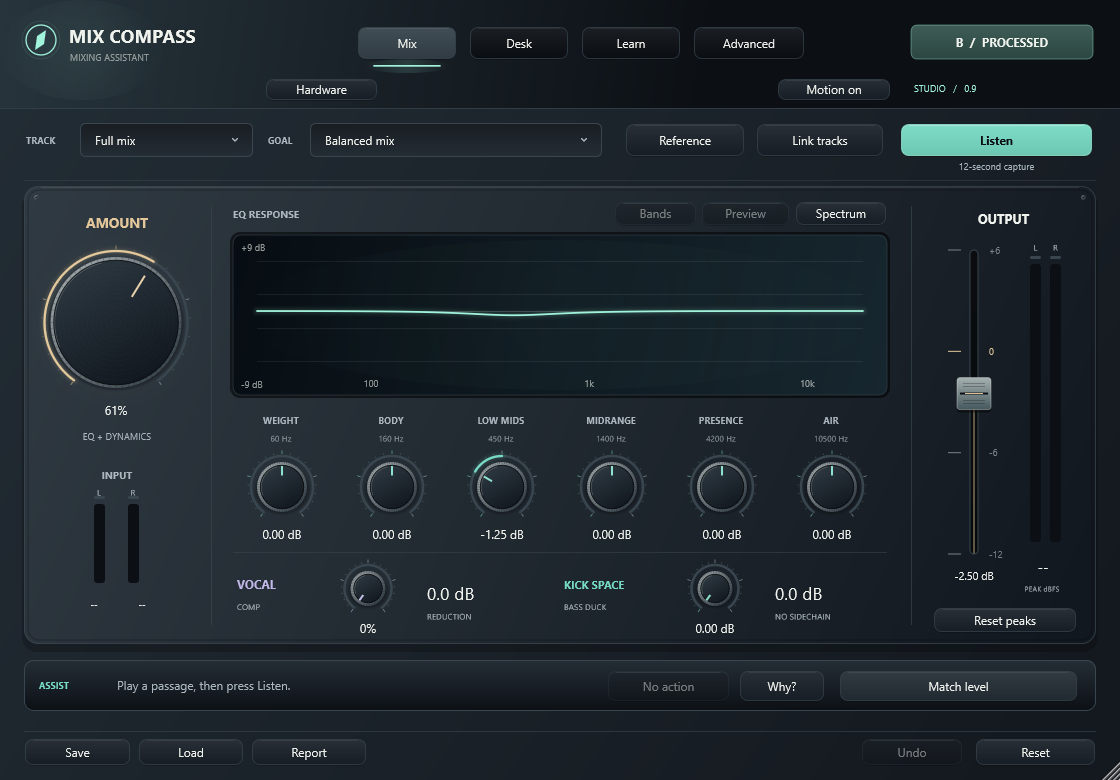
The current prototype displays its earlier working name, Mix Compass. These screenshots show test sessions, not guaranteed outcomes for every recording.
FROM FIRST TAKE TO NEXT MIX
Practical tools for the questions that come up in real sessions.
Load a reference passage and compare its broad tonal balance with compatible material. Explore a focused EQ suggestion, then decide with your ears.
Six EQ controls, an Amount dial, vocal compression, kick-triggered bass reduction, and an output fader. Adjust the details as you listen.
Link plug-in instances in Session Desk. Review instrument roles, adjust plug-in output trims, and explore suggestions for competing parts.
Check a short recording for level and signal concerns. Get a practical experiment to try, capture again, and compare with your baseline.
Open the reasoning behind a suggestion: what was measured, what would change, why it may help, and what to listen for.
Compare original and processed audio, review a level match, undo a change, and save personal profiles or a listening report.
DON’T JUST TURN A KNOB. KNOW WHY.
Follow a real prototype suggestion from observation to listening check.
Visual walkthrough · No audio playback
In this captured test passage, the guitar/keys track and lead vocal had simultaneous energy in the same midrange region. That is a reason to listen more closely—not proof the vocal is masked.
The measurement starts the conversation. Your listening decides whether there is a problem.
YOUR REFERENCE IS A DIRECTION
Choose a passage from a reference you love. Jam Maven measures the audio and can suggest a bounded tonal adjustment when the comparison supports one.
With separate tracks, linked instances also provide session context. A stereo mix can be analyzed and processed as a whole; independent instrument moves need those individual tracks.
Explore the track-by-track workflowIN THE ROOM. IN DEVELOPMENT.
We’re testing Jam Maven on real recordings and refining the sound, guidance, and workflow. The features shown here belong to the current prototype.
Learn how to compare a mixMac and wider DAW compatibility still need validation. Jam Maven is a provisional product name.
A FEW GOOD QUESTIONS